Flask(Part.73)| 【会計処理(領収書出力)】
-1280x720.jpg)

目標
領収書出力機能を作成する
領収書出力機能
領収書出力機能のための準備
ここでは、お会計後にお客様にお渡しする領収書機能を追加します。ここでは、前回同様feature-receiptブランチを利用してい作業を行います。
apps/registerapp/templates/receipt_invoice.htmlファイルの作成
apps/registerapp/templates/receipt_invoice.htmlを作成して次のように入力します。
<!DOCTYPE html>
<html lang="ja">

<head>
    <meta charset="UTF-8">
    <title>領収書</title>
    <style>
        body {
            font-family: "serif", serif;
            background: #fdfcf8;
            color: #2c2c2c;
            margin: 40px;
        }

        .receipt-container {
            max-width: 500px;
            margin: auto;
            background: #fff;
            padding: 40px 30px;
            border: 1px solid #ddd;
            border-radius: 12px;
            box-shadow: 0 6px 20px rgba(0, 0, 0, 0.1);
        }

        h1 {
            text-align: center;
            font-size: 26px;
            margin-bottom: 10px;
        }

        h2 {
            text-align: center;
            font-size: 22px;
            margin-bottom: 10px;
        }

        .company-info {
            text-align: center;
            font-size: 13px;
            color: #555;
            margin-bottom: 25px;
        }

        .invoice-meta {
            font-size: 14px;
            margin-bottom: 20px;
            border-top: 1px dashed #aaa;
            border-bottom: 1px dashed #aaa;
            padding: 10px 0;
        }

        .invoice-meta p {
            margin: 4px 0;
        }

        table {
            width: 100%;
            border-collapse: collapse;
            margin-bottom: 20px;
        }

        th,
        td {
            font-size: 13px;
            padding: 8px 4px;
        }

        th {
            border-bottom: 1px solid #aaa;
            text-align: left;
        }

        td {
            text-align: right;
        }

        .totals {
            font-size: 14px;
            text-align: right;
            margin-top: 20px;
        }

        .footer {
            text-align: center;
            margin-top: 40px;
            font-size: 12px;
            color: #888;
        }

        .print-button {
            display: block;
            margin: 30px auto 0;
            padding: 10px 20px;
            font-size: 14px;
            border: none;
            background-color: #444;
            color: white;
            border-radius: 5px;
            cursor: pointer;
        }

        @media print {
            .print-button {
                display: none;
            }
        }
    </style>
</head>

<body>
    <div class="receipt-container">
        <h1>領収書</h1>
        <p>__________様</p>
        <p>但し</p>

        <div class="invoice-meta">
            <p>伝票番号: {{ bill.id }}</p>
            <p>テーブル番号: {{ bill.table_id }}</p>
            <p>日時: {{ bill.get_created_at_jst() }}</p>
        </div>

        <table>
            <thead>
                <tr>
                    <th>商品</th>
                    <th>数量</th>
                    <th>金額</th>
                    <th>消費税</th>
                    <th>消費税率</th>
                    <th>合計</th>
                </tr>
            </thead>
            <tbody>
                {% for order in orders %}
                {% set price = (order.total * (100 - order.discount_number) / 100) %}
                {% set tax = price * (order.vat_number / 100) %}
                {% set total = price + tax %}
                <tr>
                    <td style="text-align:left;">{{ order.product_name }}</td>
                    <td>{{ order.quantity }}</td>
                    <td>{{ price | int }} 円</td>
                    <td>{{ tax | int }} 円</td>
                    <td>{{ order.vat_number | int }} %</td>
                    <td>{{ total | int }} 円</td>
                </tr>
                {% endfor %}
            </tbody>
        </table>

        <div class="totals">
            <p>小計(税抜):{{ subtotal | int }} 円</p>
            <p>消費税合計:{{ total_tax | int }} 円</p>
            <p><strong>合計金額:{{ total_price | int }} 円</strong></p>
        </div>

        <h2>{{ company.name }}</h2>
        <div class="company-info">
            住所: {{ company.address }}<br>
            電話番号: {{ company.phone }}<br>
            登録番号: {{ company.invoice_number }}
        </div>
    </div>

    <button class="print-button" onclick="window.print()">印刷</button>
    <button class="print-button" onclick="history.back()">前の画面に戻る</button>
</body>

</html>
apps/registerapp/app.py
apps/companyapp/app.pyに次の内容を追記します。
@register_bp.route("/receipt/invoice/<int:bill_id>", methods=["GET", "POST"])
@login_required
def print_invoice(bill_id):
    bill = Bill.query.get_or_404(bill_id)
    orders = Order.query.filter_by(bill_id=bill.id).all()
    # 優先フラグのある組織情報を取得(なければNone)
    company = Company.query.filter_by(is_priority=True).first()

    # 小計と消費税の合計を計算
    subtotal = 0
    total_tax = 0

    subtotal = sum(
        (order.total * (100 - (order.discount_number or 0)) / 100) for order in orders
    )
    print(subtotal)

    total_tax = sum(
        (order.total * (100 - (order.discount_number or 0)) / 100)
        / 100
        * (order.vat_number or 0)
        for order in orders
    )
    print(total_tax)

    total_price = sum(
        (order.total * (100 - (order.discount_number or 0)) / 100)
        + (
            (order.total * (100 - (order.discount_number or 0)) / 100)
            / 100
            * (order.vat_number or 0)
        )  # VATがない場合は0%
        for order in orders
    )

    return render_template(
        "receipt_invoice.html",
        bill=bill,
        orders=orders,
        company=company,
        subtotal=subtotal,
        total_tax=total_tax,
        total_price=total_price,
    )
apps/registerapp/templates/register_bill.html
apps/registerapp/templates/register_bill.htmlの末尾に次の内容を追記します。
<form action="{{ url_for('register.print_invoice', bill_id=bill.id) }}" method="post" style="margin-top: 1em;">
    <button type="submit" class="print-button">領収書印刷</button>
</form>
apps/registerapp/templates/register_bill.htmlの全体
{% extends 'register_base.html' %}

{% block title %}{{ title }}{% endblock %}

{% block content %}
<h1>伝票詳細</h1>
<p>伝票番号: {{ bill.id }}</p>
<p>テーブル番号: {{ bill.table_id }}</p>
<p>作成日時: {{ bill.get_created_at_jst() if bill.get_created_at_jst() else '' }}</p>
<p style="font-size:xx-large;">合計金額: {{ total_price | int }}</p>
{% if bill.status == 'pending' %}
<!-- 支払金額入力フォーム -->
<form action="{{ url_for('register.pay_bill', bill_id=bill.id) }}" method="post">
    {{ form.hidden_tag() }}
    <div>
        <label for="cash_amount">現金支払額:</label>{{ form.cash_amount(size=10) }}
        <label for="cashless_amount">キャッシュレス支払額:</label>{{ form.cashless_amount(size=10) }}
        {{ form.submit(class="pay-button") }}
    </div>
</form>
{% endif %}

<h2>注文内容</h2>
<!-- 一括割引フォーム -->
{% if bill.status != 'paid' %}
<!-- 一括割引フォーム -->
<p>こちらは割引率の一括変更です</p>
<form action="{{ url_for('register.apply_bulk_discount', bill_id=bill.id) }}" method="post" style="margin-bottom: 1em;">
    <label for="bulk_discount_id">一括割引:</label>
    <select name="discount_id" id="bulk_discount_id" class="custom-select">
        {% if discount_list %}
        <!-- 優先の割引率を先に表示 -->
        {% for discount in discount_list if discount.priority %}
        <option value="{{ discount.id }}">{{ discount.number }}%(優先)</option>
        {% endfor %}
        <!-- 優先でない割引率 -->
        {% for discount in discount_list if not discount.priority %}
        <option value="{{ discount.id }}">{{ discount.number }}%</option>
        {% endfor %}
        {% endif %}
    </select>
    <button type="submit" class="update-button">適用</button>
</form>
<hr>
<!-- 一括消費税率フォーム -->
<p>こちらは<span style="color: red;">消費税率</span>の一括変更です</p>
<form action="{{ url_for('register.apply_bulk_vat', bill_id=bill.id) }}" method="post" style="margin-bottom: 1em;">
    <label for="bulk_vat_id">一括消費税率:</label>
    <select name="vat_id" id="bulk_vat_id" class="custom-select">
        {% if vat_list %}
        <!-- 優先の消費税率を先に表示 -->
        {% for vat in vat_list if vat.priority %}
        <option value="{{ vat.id }}">{{ vat.number }}%(優先)</option>
        {% endfor %}
        <!-- 優先でない消費税率 -->
        {% for vat in vat_list if not vat.priority %}
        <option value="{{ vat.id }}">{{ vat.number }}%</option>
        {% endfor %}
        {% endif %}
    </select>
    <button type="submit" class="update-button">適用</button>
</form>

{% endif %}

<table>
    <thead>
        <tr>
            <th>商品名</th>
            <th>数量</th>
            <th>税抜き金額</th>
            <th>割引率</th>
            <th>税抜き金額(割引後)</th>
            <th>消費税率</th>
            <th>消費税額</th>
            <th>操作</th>
        </tr>
    </thead>
    <tbody>
        {% for order in orders %}
        <tr>
            <td>{{ order.product_name }}</td>
            <td>
                {% if bill.status != 'paid' %}
                <form action="{{ url_for('register.update_order', bill_id=bill.id, order_id=order.id) }}" method="post">
                    <input type="number" name="quantity" value="{{ order.quantity }}" min="1">
                    <button type="submit" class="update-button">更新</button>
                </form>
                {% else %}
                {{ order.quantity }}
                {% endif %}
            </td>
            <td>{{ order.total | int }}</td>
            <!-- 割引率 -->
            <td>
                {% if bill.status != 'paid' %}
                <form action="{{ url_for('register.update_order_discount', bill_id=bill.id, order_id=order.id) }}"
                    method="post">
                    <select name="discount_id" class="custom-select" onchange="this.form.submit()">
                        {% if discount_list %}
                        {% for discount in discount_list if discount.priority %}
                        <option value="{{ discount.id }}" {% if discount.number==order.discount_number %}selected{%
                            endif %}>
                            {{ discount.number }}%(優先)
                        </option>
                        {% endfor %}
                        {% for discount in discount_list if not discount.priority %}
                        <option value="{{ discount.id }}" {% if discount.number==order.discount_number %}selected{%
                            endif %}>
                            {{ discount.number }}%
                        </option>
                        {% endfor %}
                        {% endif %}
                    </select>
                </form>
                {% else %}
                {{ order.discount_number }}%
                {% endif %}
            </td>
            <td>{{(order.total * (100 - order.discount_number) / 100) | int }}</td>
            <!-- 消費税率 -->
            <td>
                {% if bill.status != 'paid' %}
                <form action="{{ url_for('register.update_order_vat', bill_id=bill.id, order_id=order.id) }}"
                    method="post">
                    <select name="vat_id" class="custom-select" onchange="this.form.submit()">
                        {% if vat_list %}
                        {% for vat in vat_list if vat.priority %}
                        <option value="{{ vat.id }}" {% if vat.number==order.vat_number %}selected{% endif %}>
                            {{ vat.number }}%(優先)
                        </option>
                        {% endfor %}
                        {% for vat in vat_list if not vat.priority %}
                        <option value="{{ vat.id }}" {% if vat.number==order.vat_number %}selected{% endif %}>
                            {{ vat.number }}%
                        </option>
                        {% endfor %}
                        {% endif %}
                    </select>
                </form>
                {% else %}
                {{ order.vat_number }}%
                {% endif %}
            </td>
            <td>{{ ((order.total * (100 - order.discount_number) / 100) / 100 * order.vat_number) | int }}</td>
            <td>
                {% if bill.status != 'paid' %}
                <form action="{{ url_for('register.delete_order', bill_id=bill.id, order_id=order.id) }}" method="post"
                    onsubmit="return confirm('本当に削除しますか?');">
                    <button type="submit" class="delete-button">削除</button>
                </form>
                {% else %}
                -
                {% endif %}
            </td>
        </tr>
        {% endfor %}
    </tbody>

</table>
<a href="{{ url_for('register.register_list') }}" class="button-link-back">戻る</a>
{% if bill.status == 'paid' %}
<form action="{{ url_for('register.print_receipt', bill_id=bill.id) }}" method="post" style="margin-top: 1em;">
    <button type="submit" class="print-button">レシート印刷</button>
</form>
<form action="{{ url_for('register.print_invoice', bill_id=bill.id) }}" method="post" style="margin-top: 1em;">
    <button type="submit" class="print-button">領収書印刷</button>
</form>
{% endif %}
{% endblock %}
apps/registerapp/static/css/style.css
apps/registerapp/static/css/style.cssに次の内容を追記します。
h2 {
    margin-top: 30px;
    font-size: 20px;
    font-weight: bold;
    color: #333;
}
Flaskアプリケーションを起動してhttp://127.0.0.1:5000/common/dashboardへアクセスして管理者権限でログインします。
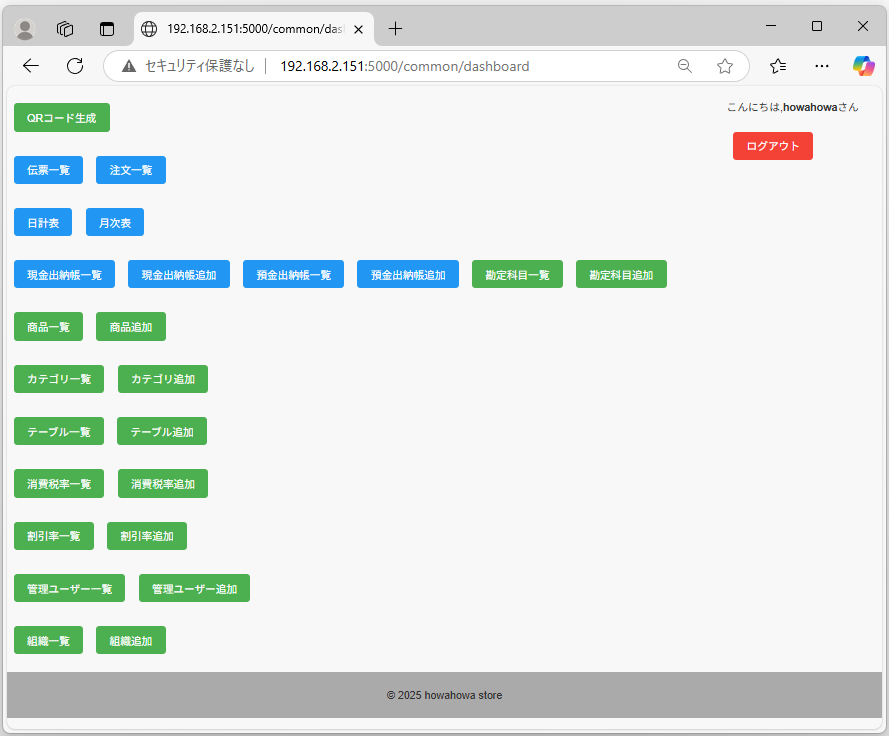
伝票一覧をクリックします。
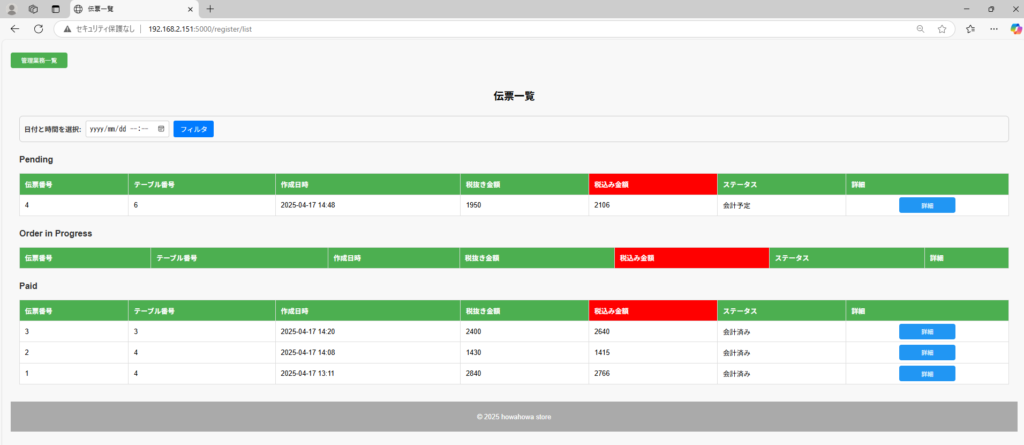
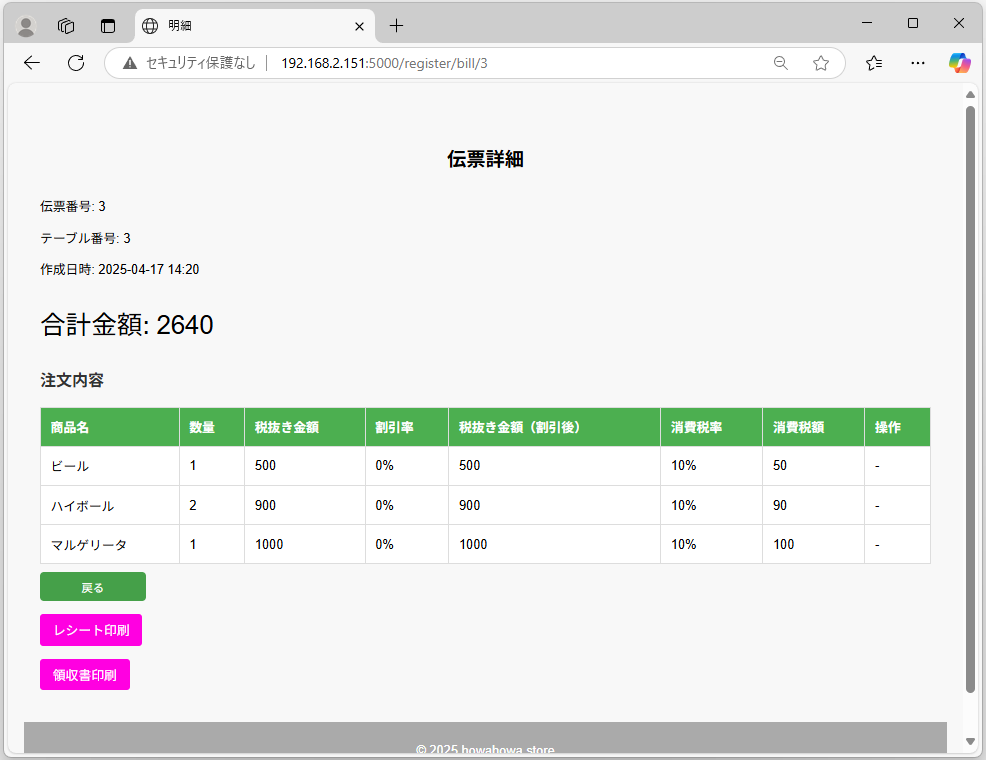
戻るボタンをクリックして伝票一覧に戻り、Paidの伝票をクリックします。領収書印刷ボタンが表示されます。
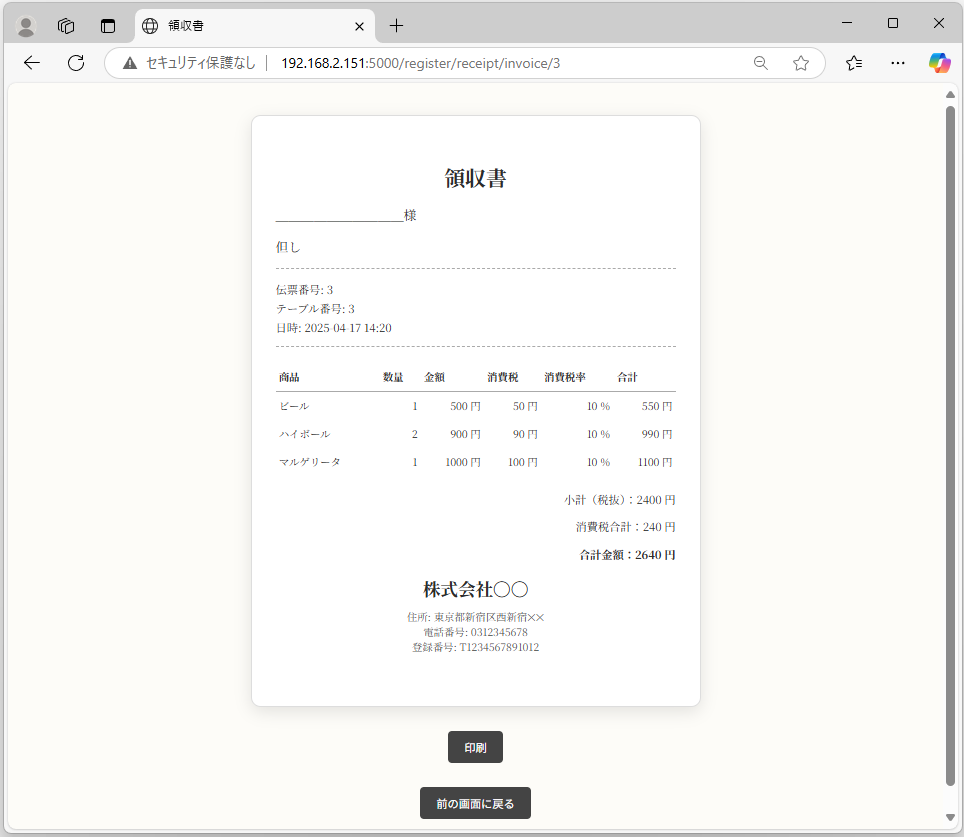
領収書印刷ボタンをクリックすると領収書印刷画面が表示されます。印刷をクリックするとプレビューが表示されます。
ここまでの内容をGitでコミットします。
$ git status
$ git add .
$ git status
$ git commit –no-verify
Add: レシートアプリケーションの作成(20250418)
ここでは、お会計後にお客様にお渡しする領収書機能を追加しています。
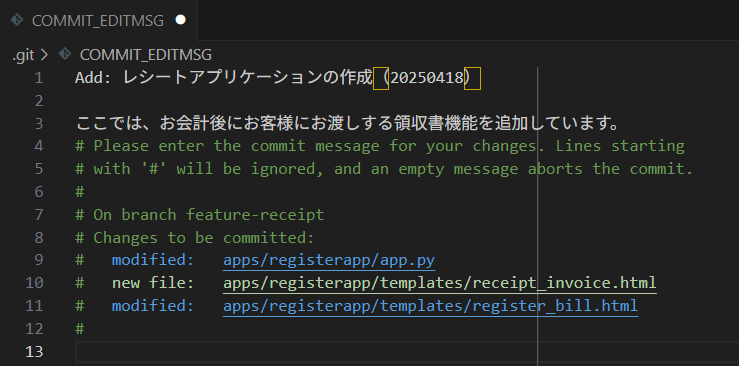
上書き保存をしてCOMMIT_EDITMSGファイルを閉じます。
今回は以上になります。



ブックマークのすすめ
「ほわほわぶろぐ」を常に検索するのが面倒だという方はブックマークをお勧めします。ブックマークの設定は別記事にて掲載しています。


-640x360.jpg)
-640x360.jpg)
-640x360.jpg)





重要用語-320x180.jpg)

多変量解析-320x180.jpg)
基本統計量-320x180.jpg)